> ## Documentation Index
> Fetch the complete documentation index at: https://docs.catenatelematics.com/llms.txt
> Use this file to discover all available pages before exploring further.
# Integration Requests
> Handle fleets whose telematics provider isn't yet supported by Catena
When a fleet goes through [**Catena Connect**](/get-started/catena-connect), their telematics provider may not yet be supported (see our [Supported Providers List](/get-started/supported-providers)). Rather than leaving the fleet with a dead end, Catena allows them to submit an integration request, signaling demand for that provider and letting you continue their onboarding in the meantime.
## **Redirect Outcomes**
Every **Catena Connect** session ends with a redirect to one of your *configured callback URLs*. There are three possible outcomes:
The fleet connected at least one supported TSP. Catena redirects to your `success_redirect_url`.
The fleet's TSP isn't supported yet, but they submitted an integration request. Catena redirects to your `success_redirect_url` with additional parameters.
The fleet exited the flow without connecting a TSP or submitting an integration request. Catena redirects to your `failure_redirect_url`.
**Integration requests use the success URL.** Submitting an integration request is treated as a successful outcome—the fleet completed the available next step. Your success handler must check the `status` parameter to distinguish a live connection from a pending integration request.
## **Redirect Examples**
* **Successful connection**
[https://your-app.com/callback?status=success](https://your-app.com/callback?status=success)
* **Integration requested**
[https://your-app.com/callback?status=integration-requested\&integration\_request\_id=5c06372b-5b5a-4477-88ee-6cd8d3b55efb](https://your-app.com/callback?status=integration-requested\&integration_request_id=5c06372b-5b5a-4477-88ee-6cd8d3b55efb)
* **Failure / Abandoned**
[https://your-app.com/failure?status=failure](https://your-app.com/failure?status=failure)
## **Query Parameters**
| Parameter | Redirect | Description |
| ------------------------ | -------------------------- | ----------------------------------------------------------------------------------------------------------------- |
| `status` | All | One of `success`, `integration-requested`, or `failure`. |
| `integration_request_id` | Integration requested only | Unique ID for the integration request. Use this to correlate redirects with webhook events or support follow-ups. |
## **Handling Integration Requests**
When your success handler receives `status=integration-requested`, the fleet has completed everything they can for now. A typical response:
Display a confirmation message explaining that their ELD provider has been requested and that they'll be notified when it becomes available.
Persist the `integration_request_id` so you can match it against future webhook notifications when the integration goes live.
If your platform supports it, grant the fleet provisional access while the integration is pending. This avoids blocking carriers who are otherwise ready to onboard.
Catena will send a webhook notification when the requested integration becomes available. Subscribe to integration request events to automate follow-up workflows.
Partners who require ELD connection for all carriers may use the `integration-requested` outcome to grant temporary access and queue the carrier for re-onboarding once the integration is live, rather than blocking them entirely.
## **Fleet Experience in Connect**
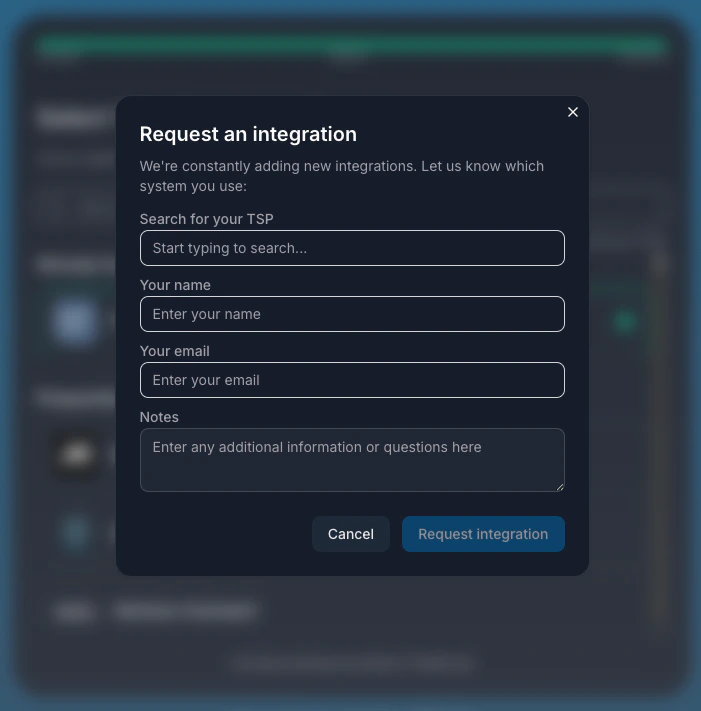 After a fleet submits an integration request, they see a confirmation screen inside Catena Connect:
* Confirmation that Catena received the request
* Option to return to your platform
* Option to add another telematics provider
This ensures fleets aren't left with an ambiguous dead end—they leave knowing their request was received.
## Configuring Callback URLs
Callback URLs are set when creating an invitation via the [**Organizations API**](/api-reference/organizations-api). Both `success_redirect_url` and `failure_redirect_url` are required.
```bash theme={null}
curl -X POST \
--url https://api.catenatelematics.com/v2/orgs/invitations \
-H 'Authorization: Bearer ' \
-H 'Content-Type: application/json' \
-d '{
"fleet_ref": "",
"success_redirect_url": "https://your-app.com/callback",
"failure_redirect_url": "https://your-app.com/failure"
}'
```
***
***
Have questions or need assistance? Our team is here to help you succeed.
After a fleet submits an integration request, they see a confirmation screen inside Catena Connect:
* Confirmation that Catena received the request
* Option to return to your platform
* Option to add another telematics provider
This ensures fleets aren't left with an ambiguous dead end—they leave knowing their request was received.
## Configuring Callback URLs
Callback URLs are set when creating an invitation via the [**Organizations API**](/api-reference/organizations-api). Both `success_redirect_url` and `failure_redirect_url` are required.
```bash theme={null}
curl -X POST \
--url https://api.catenatelematics.com/v2/orgs/invitations \
-H 'Authorization: Bearer ' \
-H 'Content-Type: application/json' \
-d '{
"fleet_ref": "",
"success_redirect_url": "https://your-app.com/callback",
"failure_redirect_url": "https://your-app.com/failure"
}'
```
***
***
Have questions or need assistance? Our team is here to help you succeed.